Krayola Green: Unleash Playful Creativity with This Crayon-Inspired Font
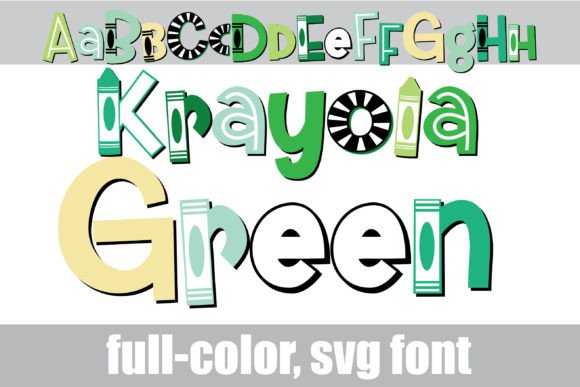
If you’re hunting for a typeface that feels like a nostalgic trip back to art class but still packs modern design punch, Krayola Green is worth your attention. This premium font isn’t just another display typeface—it’s a full-color SVG font designed to mimic the textured, waxy look of crayon strokes, all wrapped in a vibrant green color palette. Unlike standard typefaces, Krayola Green brings an instant handcrafted vibe to your projects, making it ideal for anyone who wants their designs to feel approachable, creative, and unapologetically fun.
What Makes Krayola Green Stand Out?
At first glance, Krayola Green feels like childhood joy meets professional design. The letters have that unmistakable crayon texture—slightly uneven, with soft edges and a layered color effect that mimics real crayon on paper. The primary green palette is fresh and energetic, perfect for projects that need a pop of color without overwhelming the viewer. But here’s where it gets interesting: this font includes an alt case of additional colors for each letter, accessible through your system or Silhouette’s glyph map. That means you’re not locked into one shade of green—you can mix and match colors within the same word or headline, creating dynamic, eye-catching text that feels truly custom.
As an OpenType full-color (SVG) font, Krayola Green installs just like any standard .otf font. Mac users can drop it into FontBook, while Windows folks can use their preferred font manager or Control Panel. A quick note: color fonts often appear black in non-compatible programs or even in preview windows of supporting software. You’ll know your program handles full-color SVG fonts when you type and see the colors rendered on the document. Currently, Adobe Creative Cloud apps, Silhouette Studio, Quark, Inkscape, and several others support this technology, so you’re not limited to niche tools.
Where Krayola Green Truly Shines
This font isn’t for every project—and that’s a good thing. Its playful, crayon-inspired personality makes it a natural fit for designs that target a sense of fun, creativity, or nostalgia. Think children’s book covers, toy packaging, educational materials, or event posters for family-friendly festivals. It’s also a standout choice for logo design when your brand identity leans into approachability, whimsy, or a handmade aesthetic. Imagine a local bakery, a craft workshop, or a kids’ art studio using Krayola Green in their branding—it immediately communicates warmth and creativity.
Beyond branding, consider using Krayola Green in social media graphics where you want to stop the scroll with color and texture. It works beautifully for Instagram stories, Pinterest pins, or Facebook ads promoting creative products or events. In editorial design, it can add a playful touch to magazine headers or feature titles—especially in publications focused on parenting, DIY, or education. Packaging design for art supplies, toys, or gourmet snacks with a fun twist? Krayola Green could be your secret weapon. Just remember: because it’s a display font with strong personality, it’s best used for headlines, logos, or short bursts of text rather than long paragraphs.
Practical Tips for Using This Creative Font
Before diving in, take time to evaluate whether Krayola Green fits your project’s tone. If you’re designing for a law firm or a luxury brand, this probably isn’t your font. But if you’re working on something that values creativity, approachability, or a handmade feel, it’s worth testing. Start by installing the font and checking its compatibility with your software. Open Adobe Illustrator, InDesign, or even Canva (which supports SVG fonts in some contexts) and type out a sample headline. See how the colors render—does the green palette work with your color scheme? Do the alt color options give you the flexibility you need?
Font pairing is crucial with a typeface this distinctive. Krayola Green demands a quieter partner—a clean sans serif font like Montserrat or Open Sans for body text, or a simple serif like Playfair Display for contrast. Avoid pairing it with other decorative or script fonts, as that can create visual chaos. Test different sizes, too. Krayola Green works best at larger scales where its texture and color details can shine. At small sizes, the crayon effect might get lost, reducing readability.
One of the biggest advantages of full-color SVG fonts like Krayola Green is their vector-based nature. You can scale them to any size without losing quality—perfect for everything from tiny favicon designs to massive banner prints. Plus, because it’s a premium font, you’re getting a polished design asset with thoughtful details, including those alt color characters that add versatility. Just make sure to check the commercial licensing if you’re using it for client work or products for sale. Most premium fonts include a license for commercial use, but it’s always smart to verify.
Ultimately, Krayola Green is more than just a font—it’s a design tool that injects personality and color into your work. Whether you’re crafting a brand identity, designing marketing materials, or just playing around with creative typography, it offers a unique way to stand out. Give it a try in your next project and see how a little crayon-inspired magic can transform your design approach.