Lucky Dot: A Shamrock-Inspired Font for Vibrant Designs
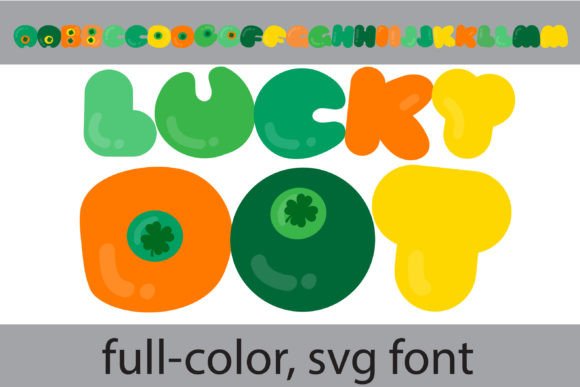
When a design project calls for personality, a standard typeface often falls short. You need something with character, a font that doesn't just convey words but also emotion and style. This is where a creative font like Lucky Dot finds its purpose. It’s a full-color SVG font designed with a playful, rounded form, where each letter is punctuated with a small shamrock dot. Its primary lime green palette is fresh and energetic, immediately setting a lighthearted and approachable tone. But the appeal goes beyond its initial look; alternate cases provide additional color options for each glyph, accessible through your system's character map or design software like Silhouette Studio.
Lucky Dot is more than a novelty. It’s a practical design asset built on modern typography standards. As an OpenType full-color font, it installs like any other .otf file. However, its true magic appears in programs that support SVG color fonts, such as Adobe Illustrator, Photoshop, Quark, and Inkscape. In unsupported environments, it will render in solid black, which is still a usable and charming design. This makes it a versatile tool for designers and creators who need a font that can adapt while maintaining its core whimsical identity. Understanding how to leverage its features is key to unlocking its potential for branding, marketing, and personal projects.
Where Whimsy Meets Practicality: Ideal Uses for Lucky Dot
The distinct personality of Lucky Dot makes it a specialized tool, not a universal one. Its strength lies in projects that benefit from a friendly, celebratory, or youthful vibe. Think beyond simple text; this is a display font meant for headlines, logos, and graphic elements where it can truly shine. For entrepreneurs and small business owners, it’s perfect for branding a children’s party service, a festive bakery, or a creative workshop. Its built-in color and shape make it excellent for social media graphics, where stopping the scroll is paramount. A bold headline in Lucky Dot can instantly convey fun and energy for a giveaway post or a seasonal sale announcement.
In packaging design, particularly for products aimed at a younger demographic or for seasonal items like St. Patrick’s Day treats, Lucky Dot adds instant thematic appeal. For bloggers and content creators, it can stylize featured images, chapter headings in a digital magazine, or logos for a podcast about crafts and hobbies. The key is application. You wouldn’t set a long paragraph of body copy with it, as the decorative elements could hinder readability. Instead, use it as a accent font paired with a clean, simple sans serif font for supporting text. This creates a strong visual hierarchy, guiding the reader’s eye and making the overall design more dynamic and professional.
Working with a Full-Color SVG Font: A Practical Guide
Integrating a font like Lucky Dot into your workflow requires a bit of technical awareness, but the payoff is significant. First, confirm your primary design software supports SVG color fonts. While modern versions of Adobe Creative Cloud and Silhouette Studio Business Edition work seamlessly, always do a quick test. Type out a word and see if the colors appear. If it’s black, you may need to update your software or work in a compatible program. Remember, the font will often appear black in the font selection preview window—this is normal. The color only renders on the canvas.
When choosing this font for a commercial project, always review the licensing. As a premium font, its license will dictate how you can use it in client work, on merchandise, or in digital products. For design consistency, explore the alternate color versions included. Swapping the primary lime green for a different palette can completely change the mood, making it suitable for a wider range of brand identities. Finally, test your font pairings rigorously. Lucky Dot’s rounded, playful forms pair well with geometric sans serif fonts like Poppins or Nunito. For a contrasting style, try it with a simple serif font like Lora to balance whimsy with structure. By thoughtfully applying its strengths, you can use Lucky Dot to inject a memorable and engaging personality into any creative project, from logo design to editorial layouts, ensuring your work stands out with cohesive and professional flair.